


Phone Tracker GPS Tracker
4.27.00 Reviews
App Specs
- Version
- 1.0.24
- Updated On
- License
- Free
- Downloads
- 100,000+
- Developer
- Teadev
- Categories
- Maps & Navigation
- Platform
- Android
Screenshots
 Analysis by AppCompare
When I judge a location-sharing app, I start with a practical question: does it help people coordinate without turning every missed call into a worry? Phone Tracker GPS Tracker is built around that balance. It is a free Maps & Navigation app from Teadev, with live GPS sharing and safety alerts at its core. I see the appeal for families or small groups who want a shared view of where everyone is, but I would treat any tracker as a tool for agreed communication—not as a substitute for checking in or getting help in an emergency.
What to Expect from Its Current Version
The current release is version 1.0.24, and the app was released on January 30, 2026. Those details give a useful snapshot of where the product stands, but they do not by themselves show what changed between releases. I would not assume that a particular feature is new or that the app has a long record of refinement. Its average rating is 4.2 from 344 ratings, and it has 100K+ installs, which suggests that people are trying it, while still leaving room for each household to decide whether the experience suits them.
For existing users, a version number matters most when it connects to a change they can actually see. After installing an update, I would check that sharing still works with the same people, that alerts are enabled as intended, and that location access has not been altered by a device setting. That is a sensible routine for any GPS app, especially when a family relies on it for a meetup or a safety check. The listing identifies this release, but I would avoid treating the number alone as proof of a specific improvement.
Useful in the Right Kind of Routine
This app makes the most sense when all participants understand why they are sharing and have a say in it. A parent and older child, partners arranging pickups, or friends meeting at a busy venue can use a shared location to reduce back-and-forth messages. A useful habit is to agree on when sharing is needed and when it can be paused. That keeps the feature tied to a real purpose instead of making constant tracking feel like the default.
Picture a parent driving to collect a teenager after an evening activity. Instead of repeated “Where are you?” texts, both people can use the map to coordinate a safe, convenient meeting point. The parent can still send a message if the map position seems unclear, and the teenager can explain a change of plan directly. That combination is more dependable than interpreting a moving pin as a complete account of someone’s situation.
What the Version Detail Does—and Doesn’t—Tell You
The app is rated for Everyone and supports Android 7.0 or later. That makes the stated minimum clear for Android users, though a phone’s own settings and location behavior still affect how any GPS app works. The release date and version are useful reference points if you are comparing what is installed on your device with the current offering. I would look at the app’s behavior after installation rather than infer a development history from a single version label.
One practical check is to test the setup before relying on it: invite the intended participants, confirm that each person understands what is shared, and try a location check while everyone is together. If an alert or map view is important to your routine, make sure the relevant people know how to use it. This small trial can reveal confusing setup steps while there is no time pressure.
Worth Reading Before You Choose

EA SPORTS FC Mobile 26 Is a Bigger Football Game, but It Takes Time

Flipboard Shows What News Apps Must Do Beyond the Feed

Switching to Android Auto Means Rethinking Your Driving Routine

Google Calendar Makes a Crowded Week Easier to Manage

Ludo King Makes the Most of the Minutes Between Plans

Baby Panda World Brings Quick Play to Modern Phones, but Its Game Library Feels Busy
Where It Fits Among Navigation and Safety Tools
Phone Tracker GPS Tracker is a different choice from a standard navigation app. Navigation tools are primarily for directions and route planning; a location-sharing app is more useful when the question is where participating people are in relation to one another. A messaging app can handle a quick “I’m here” note, but that depends on someone remembering to send it. A shared map can reduce that friction, while a phone call or message remains better when you need context rather than a location estimate.
I would not use a family tracker as a replacement for emergency services, a dedicated child-safety plan, or a navigation tool that provides the directions I need. GPS positions can be delayed or imprecise in some surroundings, and a map cannot tell you whether a person is safe, has a working phone, or is able to respond. The strongest use is coordination among people who have agreed to share—not covert monitoring or making high-stakes decisions from a pin alone.
Privacy Depends on How People Use It
Location is sensitive, so consent should be part of setup, not an afterthought. Before sharing, I would make sure each participant knows who can see their location and why the group is using the app. It is also worth deciding how to handle a pause in sharing; a person who turns it off should be able to say so without that choice being treated as proof of wrongdoing. That kind of agreement makes a tracking tool more useful and less likely to create avoidable tension.
The app’s store summary describes private location sharing and safety alerts, but I would still make privacy choices carefully on the device. Review the access requests shown during setup and grant only what makes sense for the features you intend to use. If you are installing it for someone else, explain the purpose and let them take part in the decision. A tracking app can support trust when used openly; it can undermine trust when people do not know they are being tracked.
Limits to Keep in Mind Before Relying on It
Battery use, signal quality, background behavior, and phone settings can all influence a live GPS experience. Even if an app feels responsive during a quick test, I would not assume every update will arrive instantly in every situation. For a time-sensitive pickup, agree on a backup such as a meeting point or a direct message. That is not a criticism unique to this app; it is a sensible boundary for any phone-based location tool.
There is also a difference between seeing a location and understanding it. A pin near a large building may not tell you which entrance someone is using, and a person who is moving may appear somewhere other than the spot where you expect to meet. If the group needs turn-by-turn directions, use a navigation app alongside location sharing. If it only needs a simple rendezvous, one agreed landmark and a short message may be easier than keeping everyone’s location visible all day.
Who I’d Recommend It To
I would consider this app for a household or friend group that already wants a shared location view and can agree on clear boundaries. It may be especially handy for coordinating pickups, meeting in crowded public places, or helping family members keep track of changing plans. Its free price removes a purchase decision, and the Everyone content rating makes the age classification easy to understand, but neither point replaces thoughtful setup or consent.
I would skip it if your main need is route planning, if the people involved are uncomfortable with ongoing location sharing, or if you expect a map to provide certainty in an emergency. It is also not a good fit for someone who wants to monitor another adult without their knowledge. In those situations, a regular call, a messaging app, a navigation tool, or an agreed check-in schedule is the more appropriate choice.
As Teadev continues developing the app, the useful things to watch are changes that users can verify in everyday use: clearer controls, dependable sharing, and an easy way for participants to understand when their location is visible. I would not predict a particular feature from the current version alone. For now, the most sensible approach is to test it with a small, consenting group and decide whether it reduces coordination friction without asking for more access than the group is comfortable sharing.
Ever been in a situation where you wish you could just keep tabs on your loved ones without having to call them every ten minutes? We've all been there, right? Enter Phone Tracker GPS Tracker. This nifty app promises to be your go-to solution for real-time tracking, and I couldn’t wait to give it a go. So, I downloaded it, played around, and here’s my take on it.
Getting Started: A Smooth Ride
The installation process was a breeze. Available for both Android and iOS, the app downloaded quickly, and setting it up was as easy as pie. Once you open Phone Tracker GPS Tracker, you're greeted with a simple and intuitive interface. No need for a tech degree here! It walks you through the setup process, asking permissions for location access and contacts. It might seem a bit invasive at first, but hey, it’s a tracker app, after all.
Features: More than Just Tracking
Here’s where the app really shines. It’s not just about knowing where someone is at the moment. It offers a bunch of features that make it stand out:
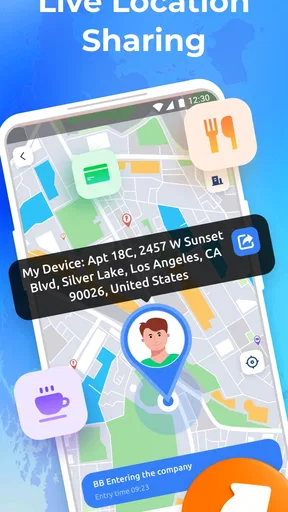
- Real-time Location Sharing: You can see the exact location of your loved ones, and they can see yours. Perfect for when you’re trying to meet up in a crowded place.
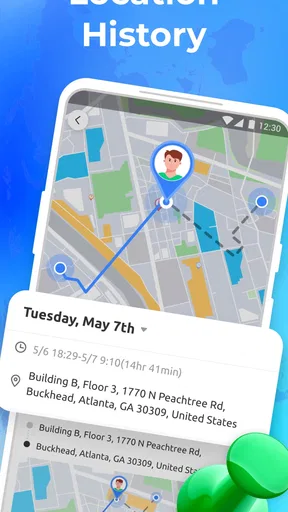
- Location History: Want to know where your teenager has been all day? This feature keeps a log of past locations. It’s like having a mini detective in your pocket.
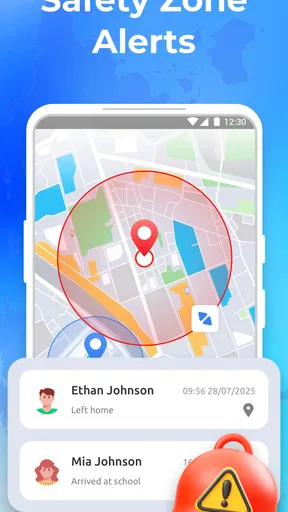
- Geofencing: Set up safe zones and get notified when someone enters or leaves these areas. It’s a peace-of-mind thing, especially for parents.
- Emergency Alerts: In case of an emergency, a quick tap sends your location to selected contacts. It’s reassuring to know that help is only a click away.
User Experience: Friendly and Functional
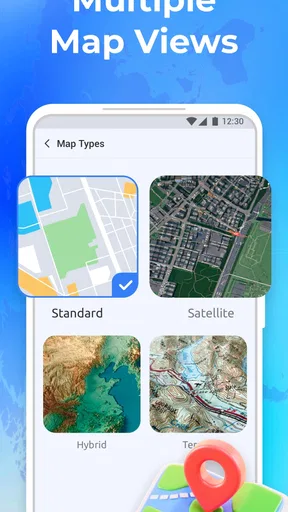
Using the app felt like second nature after a few hours. The map is clear, and the location pins are precise. The app runs smoothly without any noticeable lags, which is crucial when you’re relying on it for real-time updates. I found the notifications to be prompt, and the battery consumption is surprisingly minimal for a GPS app.
Privacy Concerns: Is It Safe?
Privacy can be a touchy subject, especially with tracking apps. Phone Tracker GPS Tracker takes this seriously. The app doesn’t store any data on third-party servers, and everything is encrypted. You have control over who sees your location, and you can turn off location sharing whenever you want. It feels good knowing your data isn’t being auctioned off somewhere.
Ending Thoughts: Is It Worth It?
So, to sum it all up, Phone Tracker GPS Tracker is a solid choice if you’re looking for a reliable tracking app. It’s user-friendly, packed with helpful features, and, most importantly, respects your privacy. Whether you're keeping track of kids, coordinating with friends, or just want that extra layer of security, it’s got you covered. Give it a try, and who knows, it might just become your new favorite app.
Head over to the app store, grab Phone Tracker GPS Tracker, and start exploring. Your peace of mind is just a download away!
Pros
- Easy-to-use interface for all users.
- Accurate real-time location tracking.
- Battery-friendly operation mode.
- Compatible with both Android and iOS.
- Offers geofencing alerts for safety.
Cons
- Requires constant internet connection.
- Limited features in free version.
- Potential privacy concerns.
- Some features need manual setup.
- In-app ads can be intrusive.
FAQs for Phone Tracker GPS Tracker
How accurate is the location tracking in Phone Tracker GPS Tracker?
The accuracy of location tracking in Phone Tracker GPS Tracker depends on several factors, including GPS signal strength, network conditions, and the device's hardware capabilities. Generally, the app provides real-time tracking with an accuracy of up to a few meters when the GPS signal is strong. In areas with weak signals, accuracy may vary.
Is Phone Tracker GPS Tracker secure and does it protect user privacy?
Phone Tracker GPS Tracker prioritizes user privacy by implementing encryption protocols to protect your data. Location sharing is secure and can only be accessed by authorized users. Additionally, the app provides options for users to control who can see their location, ensuring a high level of personal privacy.
What platforms is Phone Tracker GPS Tracker available on, and is it free to use?
Phone Tracker GPS Tracker is available on both Android and iOS platforms. The app offers a free version with basic features, while premium features may require a subscription or a one-time purchase. Users can choose according to their needs and budget, making it accessible to a wide audience.
Does Phone Tracker GPS Tracker work without an internet connection?
While Phone Tracker GPS Tracker primarily relies on an internet connection to provide real-time updates and location sharing, it can still function in offline mode. The app will store location data locally and update once an internet connection is reestablished, ensuring continuous tracking.
Can multiple devices be tracked simultaneously using Phone Tracker GPS Tracker?
Yes, Phone Tracker GPS Tracker allows users to track multiple devices at the same time. This is particularly useful for families or teams who need to monitor several members or employees. Each device must have the app installed and proper permissions set to enable tracking.


